Showing posts with label stunt programming. Show all posts

Sunday, 23 February 2020

The Cacophony Index

Can we estimate the health of an ecosystem from a digital audio recording?
(Part 2 in a series about Artificial Intelligence and New Zealand native birds.)


Inside a computer, 20 seconds of audio are represented by a sequence of 320,000 numbers.
20 seconds of audio, plotted as a waveform
Our challenge is to take that series of 320,000 numbers and extract one single number, a "Cacophony Index", that has some special properties:
  • Birds nearby and birds far away increase the Index about the same.
  • Background noises don't affect the Index very much.
  • The Cacophony Index for two sparrows chirping should be higher than if there's only one.
  • The Cacophony Index for a sparrow chirping and an owl hooting should be higher than for two sparrows chirping.

Wow, that’s a really hard thing to do! As happens often in this blog, we'll make the problem easier by adding in some assumptions:
 "Perfect is the enemy of good" - Voltaire

Are we justified in making all these assumptions?

 ...Well, no...
...but...         
... let's do it anyway.

Lets build something useful instead of freaking out that a perfect solution can't exist.

That means we're going to just ignore a whole bunch of nasty complications like “clipping”, “nyquist rate”, “attenuation”, “noise floor”, etc


Because PROGRESS!
  • Most of the loud noises in the recordings are birds, not people or cars or machines.
  • The recording is “clean”
  • The birds and the recorder stay in the same place.
  • No running water or ocean waves (!)
  • The recording was taken in New Zealand (!!)


Great stuff! Lets look at the spectrogram:

The spectrogram is a visual representation of the spectrum of frequencies of a signal as it varies with time. 

We don’t care so much about the intensity of any given bird call, that mostly tells us how near or far the bird is.

We don’t care so much if the bird has a short call or a long call.

Background noise? That’s where the spectrogram is well.. noisy..
Count the number of times a yellow box is next to a blue box!
That's the heart of the Cacophony Index calculation.

What we’re really looking for is how the spectrogram changes over time.

Lets zoom in on that starting second and add a grid to isolate the signal in both time and frequency:

A little bit more math and we find the cacophony index for this particular audio recording is: 77

OK, you got me, I'm oversimplifying again!  ¯\_(ツ)\_/¯ If you want all the gory details, the code is on github.com


Lets talk Birds!

The Cacophony Index for 20 seconds of audio is just a number between zero and one hundred. By itself, not super useful.

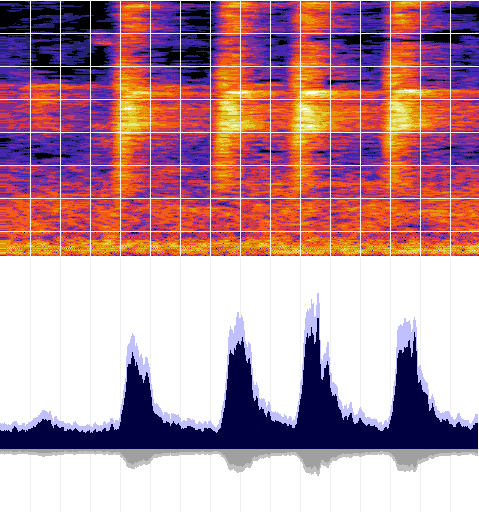
If we make many recordings in the same location, we can plot how the Cacophony Index changes over time.  Here's one possible presentation of what that might look like over the course of a day:

You can clearly see the birds are more active during the day and less active during the night. The birds getting really noisy around sunrise and sunset, the "Dawn Chorus".

Even though the plot is a mock-up, the data is real. It's data from a real bird monitor, recorded near Christchurch, New Zealand over a three week period in November of 2019. We now have the technology to see how the Cacophony Index changes over a day, or a week, or even seasons, years or decades.

And that's exactly what the Cacophony Project are doing, using real audio recorded right here in New Zealand, uploaded continuously and automatically by people just like you! (Edit: Live! Check it out!)

I think that's awesome. Can we go deeper?

Now we have an automated way to track an ecosystem's health, what else can we do with the audio data?

Watch this space for an update using real AI using Tensorflow and some real world ethical problems.

Friday, 18 October 2019

ShiftP

Buddy of mine wants to straighten some images automatically, kinda like ShiftN :


Oh, you'll want Python version 2, I said:
#makefile
PIP2=pip
PYTHON2=python

setup2:
$(PIP2) install --user virtualenv
$(PYTHON2) -m virtualenv v2
source v2/bin/activate && pip install numpy Pillow pylsd

And Python 3, I said, also in a VirtualENVironment sandbox:
#makefile
PIP3=pip3
PYTHON3=python3

setup3:
#$(PYTHON3) -m venv v3
source v3/bin/activate && pip install numpy Pillow scipy

setup: setup2 setup3
-mkdir temp

run:
source v2/bin/activate && python FindLines.py Source.jpg

source v3/bin/activate && python Warp.py

Start by finding all your lines:
#FindLines.py
import json
import numpy
import sys

from PIL import Image
import pylsd.lsd

def ExportMeta(fileName,outName):
meta={'fileName':fileName}
image=Image.open(fileName)
meta['width']=image.width
meta['height']=image.height
grayScale=numpy.asarray(image.convert('L'))
lines=pylsd.lsd(grayScale)
lineArray=[]
for row in lines:
lineArray.append(list(row))
meta['lineArray']=lineArray

with open(outName,'w') as f:
f.write(json.dumps(meta,sort_keys=True,separators=(',', ': '),indent=4))


ExportMeta(sys.argv[1],'temp/meta.json')
Always prefilter your inputs, I nagged:
#Warp.py
def FindWeightedLines(lineArray,meta):
linesHorizontal=[]
linesVertical=[]
for (x0,y0,x1,y1,width) in lineArray:
if width<2:
continue
h0=RemapXY(x0,y0,meta)
h1=RemapXY(x1,y1,meta)
dx=abs(h0[0]-h1[0])
dy=abs(h0[1]-h1[1])
if max(dx,dy)<min(dx,dy)*4:
continue
magnitude=dx*dx+dy*dy
if dx<dy:
linesHorizontal.append([magnitude,h0,h1])
else:
linesVertical.append([magnitude,h0,h1])

return sorted(linesHorizontal)[-30:]+sorted(linesVertical)[-30:]
#Always prefilter your inputs!!!

Now here's the tricksy bit, in *TWO* parts, setup a perspective transform:
#Warp.py
def RemapXY(x,y,meta):
xx=(x-meta['width']/2)/meta['scale']
yy=(y-meta['height']/2)/meta['scale']
return (xx,yy,1)

def UnmapXYZ(xx,yy,zz,meta):
rx=xx/zz
ry=yy/zz
x=rx*meta['scale']+meta['width']/2
y=ry*meta['scale']+meta['height']/2
return (x,y)

*And* a non-linear warp. We don't need the full power of Chebyshev Polynomials here, I reminded him. We can just use 0, 1, x, y, x2, y2 and xy. Why? Because all spanning basis-es are equivalent in low dimensions!
#Warp.py
def ApplyTransform(transform,x,y,z):
rx=x*transform[0]+y*transform[1]+z*transform[2]
ry=x*transform[3]+y*transform[4]+z*transform[5]
rz=x*transform[6]+y*transform[7]+z*transform[8]
nonLinear=True
if nonLinear:
rx+=x*y*transform[9]
ry+=x*y*transform[10]
rx+=x*x*transform[11]
ry+=x*x*transform[12]
rx+=y*y*transform[13]
ry+=y*y*transform[14]
return (rx,ry,rz)

def ApplyTransformhomogenous(transform,x,y,z):
(hx,hy,hz)=ApplyTransform(transform,x,y,z)
return (hx/hz,hy/hz)

Next you'll need a loss function, weakly constrain your transform matrix, then setup a sum-of-squares for your error term:
#Warp.py
def loss(transform,meta):
result=0
for i in range(9):
t=transform[i]
if i==0 or i == 4 or i == 8:
t=transform[i]-1
result += t*t

for(weight,h0,h1) in meta['weightedLineArray']:
(x2,y2)=ApplyTransformHomogenous(transform,*h0)
(x3,y3)=ApplyTransformHomogenous(transform,*h1)
dx=abs(x3-x2)
dy=abs(y3-y2)
if dx<dy:
(dx,dy)=(dy,dx)
q=math.sqrt(dx*dx + dy*dy)
dx=dx/q
dy=dy/q

result += dy*dy

Are we done yet? Oh, a driver...:
#Warp.py
def Main():

with open('temp/meta.json','r') as f:
meta=json.loads(f.read())
meta['scale']=math.sqrt(meta['width']*meta['height'])/2

meta['weightedLineArray']=FindWeightedLines(meta['lineArray'],meta)

m=minimize(loss,[1,0,0,0,1,0,0,0,1,0,0,0,0,0,0],args=meta)

transform=m.x

(x0,y0,x1,y1) = FindClipRectangle(...)

source=Image.open(meta['fileName'])
image=Image.new('RGB',(x1-x0,y1-y0),(0,0,0))
draw=ImageDraw.Draw(image)
meta['splitCount']=64
for x in range(meta['splitCount']):
for y in range(meta['splitCount']):
p00=SquareMap(x,y,meta)
p01=SquareMap(x,y+1,meta)
p10=SquareMap(x+1,y,meta)
p11=SquareMap(x+1,y+1,meta)

r00=ApplyTransform(transform,*RemapXY(*p00,meta))
r01=ApplyTransform(transform,*RemapXY(*p01,meta))
r10=ApplyTransform(transform,*RemapXY(*p10,meta))
r11=ApplyTransform(transform,*RemapXY(*p11,meta))
s00=UnmapXYZ(*r00,meta)
s01=UnmapXYZ(*r01,meta)
s10=UnmapXYZ(*r10,meta)
s11=UnmapXYZ(*r11,meta)
TextureMapTriangle(draw,x0,y0,x1,y1,source,s00,s01,s10,p00,p01,p10)
TextureMapTriangle(draw,x0,y0,x1,y1,source,s10,s01,s11,p10,p01,p11)
print('Progress %d/%d'%(x,meta['splitCount']),flush=True)

image.save('temp/warped.jpg')

Oh, and you need texture mapped triangles? Python is terrible for that, there's no way to make it run fast.... Fine, here's one of those, just to get you started, but don't blame me if it's slow, this needs to be in OpenGL or something so you can run it on the GPU and apply proper gamma correction.

#TextureMapTriangle.py
def Left(p,a,b):
cross=(p[0]-a[0])*(b[1]-a[1])-(p[1]-a[1])*(b[0]-a[0])
return cross<0

def SampleMap(source,x,y,dx,dy):
if x<0:
x=0
if y<0:
y=0
if x>=source.width:
x=source.width-1
if y>=source.height:
y=source.height-1
return source.getpixel((x,y))


def TextureMapTriangle(draw,x0,y0,x1,y1,source,p0,p1,p2,uv0,uv1,uv2):
xy0=list(map(min,zip(p0,p1,p2)))
xy1=list(map(max,zip(p0,p1,p2)))

dx1=p1[0]-p0[0]
dy1=p1[1]-p0[1]
dx2=p2[0]-p0[0]
dy2=p2[1]-p0[1]
det=dx1*dy2-dx2*dy1
if xy0[0]<x0:
xy0[0]=x0
if xy0[1]<y0:
xy0[1]=y0
if xy1[0]>x1:
xy1[0]=x1
if xy1[1]>y1:
xy1[1]=y1

for x in range(math.floor(xy0[0]),math.ceil(xy1[0])):
for y in range(math.floor(xy0[1]),math.ceil(xy1[1])):
p=(x,y)
if Left(p,p0,p1):
continue
if Left(p,p1,p2):
continue
if Left(p,p2,p0):
continue

dx=x-p0[0]
dy=y-p0[1]
u=(dx*dy2-dy*dx2)/det
v=(-dx*dy1+dy*dx1)/det

uu=uv0[0]+u*(uv1[0]-uv0[0])+v*(uv2[0]-uv0[0])
vv=uv0[1]+u*(uv1[1]-uv0[1])+v*(uv2[1]-uv0[1])
c=SampleMap(source,uu,vv,1,1)
draw.point((x-x0,y-y0),tuple(c))


And then you could be like me, and license all of the above code under CC0. Yay!

Thursday, 10 May 2018

Duplex


Duplex. That’s the technology at Google I/O 2018 where an AI agent can use the existing telephone network to call a restaurant, book a table for 4 at 7pm, and adapt to common problems.

Things get more interesting when the restaurant runs a similar service. AI talking to AI.

Whenever two learning AI’s get together, every single time, they develop a new language. One that us humans can’t understand.

I can imagine the following “conversation”: Alice, a digital assistant, is calling Bob, an AI agent for the restaurant.

  Alice and Bob together: Hi

  Alice: Umm, er, hmmm, yes?

  Bob: Table confirmed, 4 people, tonight at 7pm.

  Alice and Bob together: Bye

Lets slow that recording down and play it back again, annotated this time:

  Alice and Bob together: Hi
       Handshake protocol, are we both digital software? Yes we are.

  Alice: Umm, er, hmmm, yes?
       Translation: I’d like to book a table for 4 people anytime between 6pm and 9pm

  Bob: Table confirmed, 4 people, tonight at 7pm.
       Lets repeat everything for the recording the humans will review.

  Alice and Bob together: Bye
       Handshake protocol, confirm booking.


Are there new words the AI can teach us? More efficient grammatical structures? Can the AI teach us humans to communicate more effectively?

If there is, the AI won’t tell us.

Unless we know how to ask.

Friday, 11 November 2016

Brexit, Elections, and population in 2016

Define: “effective political unit”

If politics is the name we give to a group of people making decisions that affect all the members of that group, then we can use “effective political unit” (EPU) as a catch-all name to reference that group.

Your household is an EPU. Your local sports team is an EPU. Your neighborhood and your city are both EPUs, as is your country, and each of your online communities.

We can get a rough feel for the relative size of an EPU by adding the search term "population" and hitting the "I'm feeling lucky" button on google:

EPUSize (million people)
UK65
California35
Scotland5
Quebec8
London (England)8
London (Ontario)0.5
You0.000001
Me0.000001
You & Me together0.000002
USA320
North America (*)580
Singapore6
OECD (*)560
China1350
Eve Online0.4
Alberta4
New Zealand4
Islam1600
World7500
Tokyo14

(*) The OECD includes all of North America, so as with any "I'm feeling lucky" google search, the error bars are large.

A natural question to ask: "Given each Effective Political Unit is a group of people making decisions, what size of EPU is the most successful?" It's hard to pick an exact number, but like many trends associated with people, it's increasing over time, and the rate of increase is increasing:


EPUSize (million people)Year
Toba Catastrophe0.0770,000 BCE
Nomadic tribe0.001prehistory
Ancient Greece5400 BCE
Ptolemaic Egypt7300 BCE
Han dynasty572 CE
Ancient Rome (peak)60160 CE
Mayan city0.1700 CE
Walmart Employees22015 CE


2016


A vote for a protectionist like #Trump favors smaller (USA, 320) over #Clinton's larger (World, 7500).

A #brexit vote favors smaller (UK, 65) over #remain's larger (EU, 500).

A #califrexit (California, 35) is even smaller still.

Which brings us back to the core question of this blogpost: What size of EPU is the most successful?

Historically, every EPU has had a maximum size, once it extends past that point, it is doomed to collapse. At the same time, history is filled with EPUs that were too small, and were out-competed by slightly larger EPUs which were more effective.


It's a classic value judgement.


As social animals, we weigh the perceived risks and benefits between larger EPUs and smaller EPUs, and make a call, then find a post-hoc rationalization for our decision.


What I find fascinating is the schism between younger voters and older voters. If you look into the various exit polls around the world, a clear trend starts to emerge: Older voters seem to be favoring the 10MM-50MM range, while younger voters seem to be consistently voting in support of larger and larger EPUs.

What does it all mean? At the risk of rampant speculation, do younger voters have more confidence in technology to enable larger and larger EPUs? Do older voters have more hands on experience with large EPUs getting out of control and collapsing? I really have nothing to back up either of those statements, but it sure is fun to make sweeping generalizations :D

Let me know your thoughts in the comments down below!

Sunday, 9 October 2016

Cheapest 3D Printer

My latest obsession is trying to build a 3D printer for as cheap as possible.

Partly it's because I believe 3D printing is a disruptive technology. The lower the cost for making a 3D printer, the more people will have access to the technology, and sooner the disruption will take place.

And partly, it's because I'm just really really cheap.


Low Cost

What does low cost really mean? One obvious way is to look at the price of something if we were to buy it new in a shop. If we only source new parts and new materials, we're going to have a difficult time creating something truly low cost.

My strategy is different. I'm going to try and get as many of the source materials as possible for "zero dollars."

Consider old car tyres. Any time you can recycle the rubber from an old car tyre into a seesaw or a swing, or into building materials or to protect a wharf, then the cost of that rubber is effectively "zero dollars."

That's why the core design elements of my 3D printer are going to be fishing line and lego. Two very cheap substances if you source them the right way.

Fishing Line

Nylon fishing line is an amazing substance. It's strong. Durable. Inexpensive. It's readily available everywhere around the globe. And if you need small quantities, you can often obtain it for "zero dollars". You probably already have some.

Lego

Lego is an amazing substance. It's available everywhere. It's manufactured to extremely high tolerances. It's consistent across time and place. It comes in a variety of colors. It's durable.
While lego might not be cheap, you can often *borrow* lego for "zero dollars" by using the magic words "I'm trying to make a 3D printer out of lego."
Once your print run is complete, you can simply disassemble the lego and return it to it's previous state.

Calibration Problem

When I look at the designs for existing 3D printers, one of the biggest design considerations seems to be finding out where the extrusion point is in relation to the "bed". Existing designs carefully measure the motion of the motors, try really hard to make the frame rigid, and then have lots of complicated software to try and calculate where exactly the filament is being deposited.

Ack, too difficult.

Why go through all the calculation, when you can measure directly?

My plan is to use the camera on an Android tablet to see where the bed is, and, at the same time, to see where the print head is. If it needs to move to the left, well, the tablet will keep the motors spinning until it lines up. Too far to the right? no problem, spin the motors the other way until it matches. Checkmate calibration problem!

OpenCV


Oh, and remember our lego? We know exactly how large a block is in the real world, so we can measure off distance in our 2D camera space by placing a known lego calibration object made with a few different known colors.

This way it doesn't matter if our fishing line stretches during the course of the print, or our lego gets bumped half way through, or the ambient temperature changes which make the layers a tiny bit thinner.. no problem, the camera on the android tablet sees all.

And how much does it cost for an Android tablet? "zero dollars." You just have to use the magic words: "Can I borrow your Android tablet to make a 3D printer?"

Next Steps

I've already starting on version 1 of the prototype. Watch this space.

Saturday, 1 October 2016

ELI5: What are the differences between the C programming languages: C, C++, C#, and Objective C?

"Hello World" in C
C, C++, C# and Objective-C are all programming languages. They're all special ways of writing where a programmer can ask a computer to solve problems for the programmer.

Don't be fooled by the letter “C” in their names, the 4 languages are actually quite different.


C is the oldest of the 4. It was one of the first really popular programming languages because it was good at solving the types of problems that programmers had way back in the 1980's. Things like “portability”, “memory management” and “correctness”.

C is quite a simple language, which means you need to do a lot of writing to ask the computer to do complicated things.


C++ is actually C with lots and lots of extra stuff added in. It's name is a pun, where to the computer, C++ means something like “better than C”. And yeah, there's other computer languages with pun names like “D” and “F#” too. Because C++ is a lot more powerful than C, you don't need to write quite so much stuff to get the computer to do complicated things.


Objective-C is also C but with different stuff added into it. Both Objective-C and C++ try and help programmers solve tricky problems using something called “Object Oriented Programming” (OOP). That's where the “Objective” part in Objective-C comes from. OOP was really good at solving the kinds of problems we had back in the 1990's.

OOP is so successful because it helps teams of programmers work together and co-ordinate. Any time you have a large group of programmers working together, especially on the very largest software projects, you'll find that they're using some version of OOP to help them all co-operate.


Because both C++ and Objective-C have a shared history in C, if you wanted, you could take a C program and pretend that's it's C++ or Objective-C and most of the time that might even work!

What really happens though, is that because the languages are so different, it changes the way that programmers think about their problems. This means that C programs, C++ programs and Objective-C programs all end up looking quite different from each other, even when programmers are trying to solve the same problem. ( See also: Sapir–Whorf hypothesis. )


Which brings us to C#. C# isn't really a C language at all. There's actually another programming language called Java that used to be really popular around the year 2000 because it helped with the OOP problem much better than anything else. A company called Microsoft wanted to make something that was kind of like Java, but kind of different too. So they created C# to work a lot like Java, but changed things up a little bit so that it looks kinda like C if you squint.


Well here we are in 2010's, and the kind of problems programmers are facing have changed again. It turns out that using OOP can sometimes combine with other problems to make them more complicated, graphics problems like “threading” and “latency” or the special problems that come up with Artificial Intelligence for example.

While we have newer languages like “Cg”, “R” or “Python” that try and address some of these newer problems straight on, it turns out the simplicity of C allows individual programmers to focus more clearly on the problems that are important to them. That's why C is still popular today, even though it's the oldest of the 4.


TL;DR: C is really simple. C++ and Objective-C are kind of similar because they're both C with extra stuff for “Object Oriented Programming” (OOP). C# is the oddball because it isn't really a C language at all, it's more like Microsoft's version of “Java”.


Source: Am programmer.

Saturday, 12 September 2015

Keeping our kids safe, with better level design and video games.

Our local bus stop used to have a safety problem. All the school kids would line up, frantic to be first on the bus.

The front kid would stand with their toes hanging over the curb. The next one behind them, peering over their shoulder, and so on and so forth... They would stand that way in pseudo-formation, for agonizing minutes at a time, as the cars zipped past on the morning commute. Finally the enormous school bus would swing in and stop mere centimeters away from the nose of the kid in front.

Just one tiny fumble, or even just one loud boisterous dog, could have spelled tragedy.

I spoke about it with the other Mums and Dads. I know from designing levels in video games that there's an easy fix we use for these kind of problems. I told them someone could simply paint a yellow “Do Not Cross” line on the ground, and the kids would naturally do the rest, even when the parents weren't around.

For the record, I've never defaced public property, nor would I encourage anyone else to do the same.

Yet some anonymous do-gooder has gone and done just that:

Vigilante safety engineering - a yellow "Do Not Cross" line has been painted at this local school bus stop by an anonymous parent, obviously over the concerns about child safety.

All the kids now line up a safe distance from the road, and the possibility of tragedy at our local bus stop has been dramatically reduced.

Well sure, this act of civil disobedience might not be able to protect the neighbourhood kids from the harmful rays of the sun, mindless advertising, unvaccinated kids or bad language... but at least now the kids at my local bus stop line up further away from the traffic.


If you have a concerns about traffic safety at your bus stop, here's one small thing that any anonymous do-gooder can do, that will actually make a difference, all thanks to better level design and video games.

Saturday, 29 November 2014

Why he vertically aligns his code (And why you shouldn't)

Over on Terence Eden's blog, the latest post is about vertically aligning code : https://shkspr.mobi/blog/2014/11/why-i-vertically-align-my-code-and-you-should-too

The "bad" example looks like this:

Which is then "fixed" to make it look like this :


Just for comparison, I typed it into my regular text editor:


The point being, because I'm using a well designed syntax highlighting where the numbers (green) contrast with the operators.  If you so choose, you can visually inspect just the green numbers and just as easily spot the outlier.

(Pro-tip: To concentrate on just one color, defocus your eyes slightly by staring "through" the plane of the monitor to engage your eye's cone cells.  With a little practice, you'll find yourself doing this automatically when you want to focus on the structure of the code instead of the details.  For best results, you might need to make the glyphs larger on screen....)

Note too, how the combination of proportional font and camelCase instead of under_scores keep the code density onscreen the same, but the individual glyphs appear larger in-place.

My code editor also uses syntax highlighting to hint the kerning.  So for example, the kerning around the equals sign and the semi-colon are particularly loose to aid in their recognition. Similarly, the single space character (' ')  has a width 50% larger than would be used for normal paragraph text.

But here's the big change that Terence missed, I've sorted all the variable declarations alphabetically to ensure there are no duplicates.  This is a zero-cost policy that can simplify merges and conflict resolution when multiple variables (possibly duplicate) have been added upstream.

Coding Atoms

The bigger problem is the coding atom is the line-of-code.

Lets take another code example from Terence's blog post, this time a function declaration :

extern int SomeDemoCode(int fred,
                        int wilma);

That's an atom right there - you can't split that up without changing its meaning. Watch what happens if I try to add a parameter in an excess white-space environment:

extern int SomeDemoCode(int fred,
+                       int barney,
                        int wilma);

The diff splits our (atomic) function signature across 3 lines, exposing us to problems where a git merge might accidentally succeed, when really we need it to flag a merge conflict.

(For a real world case of how bad automatic merging can be, take a look at the Goto Fail Bug)

Now compare if everything had been on the same line, the diff would look like :

-extern int SomeDemoCode(int fred, int wilma);
+extern int SomeDemoCode(int fred, int barney, int wilma);


TL;DR: Using whitespace to control your code presentation is a hack from the '70s.. get a better editor.

p.s. Some formatting edits have been made to make this post clearer.

Saturday, 19 October 2013

Praise the Fire Fighter, Damn the Safety Inspector

There's a sickness eating our industry.  It's a culture of Macho Programming.  In it's simplest form, it's the idea that if we just push harder, longer, stronger, then we will win.  Yet time and time again, experience shows that the way to win is by working smarter.

Side-effects

I was once working on a particular AAA title.  The game was running late.  We were in crunch, and had been for a while.  There was no end in sight.  I came across the following code:(1)

bool DetectCollision(Vector3 location, float radius){
  ...
  radius * 1.2f;
  ...
}

So that line of code makes the collisions a bit fatter.  It's what we call a 'Fudge Factor' - we don't know why a problem is occurring, so we fudge the numbers a little until it works.

But take a closer look.  The statement as written has no side-effects.  It doesn't actually modify the value of radius.  When the programmer wrote:

  radius * 1.2f;

they intended to write:

  radius *= 1.2f;

Let's review the facts:

  • It's the wrong fix to begin with (fudge factors are generally a bad idea)
  • It doesn't actually change the behaviour of the running program
  • The programmer didn't verify that their "fix" worked

And we can safely assume that the programmer didn't verify the original bug in the first place.

Compound Fail

It gets worse.  In this late stage of crunch, there were so many easily avoidable bugs coming in to the code, that the production team mandated every changelist required a second programmer to sign off.

That's right, not one, but two programmers, working together, managed to convince each other that this placebo changelist actually improved the game.  Together, they marked the bug as fixed and sent it back to QA, fully confident they had made the game better.

What other trivial mistakes did those programmers make that night?

What a colossal waste of time and resources, simply because those two programmers had inadequate sleep.  The project would have been much better off if those two programmers had just gone home at 18:00.  Or 17:00.  Or even 14:00.

[Edit: I just wanted to add, these are actually two really good programmers! I'd jump at the chance to have them on my team again.  The equation here is crunch + good programmers = too many careless mistakes.]

Praise The Fire Fighter ...

When you're deep in crunch, it's easy to see the heroic efforts, the mountains of caffeinated beverages, the change logs at 4am.  It's easy to point to the person who's working the hardest and say "We all need to be more like that guy."  Because when it's all falling apart, you need to do something.
(Hint: That something we need to do is to get more sleep.)

... Damn the Safety Inspector

And when you're at the beginning of the project, and the Safety Inspector is telling you that what you're building isn't up to code, that the schedules are unrealistic and will lead to crunch, slipped deadlines, hard-to-find bugs and adds unacceptable levels of risk to the project...  Well they're easy to dismiss "We're trying to build something here! Why are you trying to stop us?"
(Hint: The Safety Inspector is probably right.)

Macho Programming

As an industry, we should be working smarter than that. We should be rewarding measurable results and hard evidence, rather than effort and posturing.

To me, Macho Programming, is blundering onward in whichever way you possibly can, without regard to what's best for the project or the team, simply for the appearance of getting something done.

I think we can do better than that.  In the true Agile sense, as a team, we need to make the best decisions based on the best information we have, right now, and move forward in the best direction we can.

Who's with me?


(1) Some details have been changed to preserve anonymity.

Monday, 30 September 2013

ScooterBoy NZ Launch at Digital Nationz


ScooterBoy and Modka Games was lucky enough to be involved with the Homegrown exhibit at the Digital Nationz expo!

The ScooterBoy booth at Digital Nationz

Hands on

Our booth consisted of a large monitor hooked up to a laptop (Display Mirror), playing the actual game.  We had a second laptop with a slideshow, and then lots of glossy printouts of the logo, icon and artwork.

www.scooterboygame.com
We also had two iPads running the game, which we tried to get into the hands of as many players as possible, getting some awesome user feedback.

Oh, and a portable "QR" code with a direct download link for iPhone users!

Attract Mode


For the main screen, we cooked up a special build of ScooterBoy running in "Attract mode" - basically bouncing between the intro comic, level selection, and the game itself, choosing random levels, scooters, characters, pets, music, etc.

I hooked up Momma's AI to the player, so the game would merrily play itself with no human intervention required.

"Attract Mode" turned out to be a super useful feature, it meant we could talk to gamers 1 on 1, while the screen continued to play for the small crowd that gathered.

... in fact "Attract Mode" proved to be so useful, that on the second day of the expo, two other Indies had added the feature to their game!

Big Screen


ScooterBoy also got some time on this awesome 103" panel upstairs in the chill out zone.  It really shows off the amazing HD retina graphics in ScooterBoy!

Telecom Homegrown "BigScreen", running ScooterBoy

Thanks!

Thanks everyone for making an awesome #ScooterBoyGame weekend with @DIGITALNATIONZ

And a special shoutout of thanks to Telecom, Asus, @oldjackgrey, @BenTuhoeKenobi and @sknightly!!

Shameless Plug

And if you're in New Zealand, and own an iPhone, iPad or iPod touch, why not download ScooterBoy and give us a rating! ScooterBoy on NZ App Store

Friday, 22 February 2013

The Squeeze

I've been adding a lot of content to ScooterBoy over the past week, and it's been causing some problems.

In particular, the size of the archive had grown to over 100MB.

Increasingly, I've come to realize that speed of iteration is one of the biggest factors in determining overall project success.

The large archive size was causing slow sync times with the tablet, and even longer upload times on my rural broadband connection.

Something had to be done.

Enter WebP


WebP is a relatively new graphics format (2010), published by Google, both patent-free and open-source.

It's like a super-JPEG and a super-PNG all rolled in to one. Oh, and it fully supports alpha!

Here's one I prepared earlier: (click through for full size images)

Original PNG, 540KB

WebP version, 23KB

(WebP version as lossless PNG, for comparison only)
In this particular example, that's a whopping 95.7% saving in space!!

Obviously results will vary, but I'm consistently seeing 75% - 90% save spacing over the equivalent PNG/JPG, for a reasonable reduction in quality for tablet devices.

I'm also finding that the compression artifacts are of a type that is less annoying than PNG or JPEG. (Apart from some YUV color noise at very low bitrates - hopefully google will fix this in an update)

And it was super easy to integrate into my codebase.

Want even more info? Go grab the source over at developers.google.com


And my archive size? Now down to a very manageable 22MB.


Monday, 14 January 2013

Background Test

Here's a screengrab of the backgrounds from one of the first levels in the new game.  You can see some of the UI starting to take shape as well!


And a video capture too - click through for 720p!


Sunday, 13 January 2013

Terrain


I'm doing some more work on the terrain today.

It's another great mix of traditional and procedural artwork.

I've taken this screenshot from in the editor mode, and if you look closely, you'll notice the green circles which mark out the knots in the splines.

You can move the knots around by left click'n'drag with the mouse, or change the slope at that point with right click'n'drag.

I've even set up the physics so the player is actually riding over the splines directly without requiring a separate collision mesh.


This mix of hand drawn and procedural content is a great combo we're using throughout the game : The original artwork sets the overall tone, while the procedural content optimizes for your specific tablet.


Friday, 28 December 2012

Self-Drive Engage

Lately I've been thinking a lot about self-driving cars.

You see, the whole point of a self-driving vehicle is that the occupants of the vehicle are absolved from all the responsibility and all of the joy of operating the motor vehicle.

In such a scenario, which is currently playing out in both California and Nevada, the part that I've been thinking about the most is: Who should be responsible for paying the speeding tickets?

It brings in a number of thorny questions, not the least of which is the difference between driving safely and driving legally.  I hope that we can assume that the car will be authorized to drive safely first, and legally second. (Please let me know in the comments below if this is not the case!!)

It also calls into question the goal of the speeding ticket program in general.  If the goal is to genuinely limit the Kinetic Energy of the vehicle (= mass x sqr(velocity)/2), then lets forget about speeding, and instead record this computed kinetic energy quantity in a continuous manner, along with the GPS co-ordinates, and at the end of the month compare it with the local authority's database of speed kinetic energy limits.

Behavior Modification

In gaming terms, a (speeding) fine is a way of modifying behavior by producing a sharp negative feedback at random intervals.  This is among the most effective ways we know of reducing an undesired player behavior.

Unfortunately this technique simply does not work against computer software.  The only people qualified to change the software are the developers, and it requires active participation on the vehicle owner's part to update the software on a regular basis.

Insurance

I hereby propose an Insurance based licensing scheme for self-drive vehicles.  I propose that in order for a vehicle to (legally) use a self-drive mechanism, the owner of the vehicle must purchase insurance from an organization that is both state licensed, and independently audited.  Eligibility for any given insurance policy will be based on the make and model of the vehicle, plus the software package, version and database of the self-drive mechanism.  At the end of the month, all of the occasions when vehicles with the same policy have exceeded the posted speed kinetic energy limit are summed up, and it's the insurance policy fund which pays out to the state, with no additional per-vehicle owner expenses.

This creates a market for insurance policies.  You can purchase cheaper insurance by buying more conservative software, or pay more in insurance but arrive at your destination sooner with more aggressive software.  As technology and software changes and improves, so too will the market for your self-drive insurance match the current conditions in your state.

And if the price of the insurance is too high for your particular vehicle (e.g. it's too old, or too unsafe, or you're currently out-of-state), you can always opt-out and disable the self-drive feature of your vehicle.

Incentives


This proposal create the right incentives, the software developer must use the best software engineering techniques, the vehicle owner must keep their vehicle updated with the latest software, the insurance socializes the speeding costs amongst all vehicle owners of the same class, and the market ensures an efficient allocation of policies and choice of software programs across all the vehicles in the state's fleet.

The one piece of the puzzle that's missing is the state.  Suppose that a speed kinetic energy limit on a particular stretch of road is changed, but the software developers aren't notified in a timely manner.  In this case, the state itself has been negligent, and it's the state itself which should be fined for putting motorists at risk.  In the same way that the state must adequately signpost the speed limit, so should be it's responsibility to notify the state licensed self-drive software developers.

Speeding?

Of course, I've used speeding as an example of unsafe vehicle behavior, but this regulatory framework extends in a natural way to all vehicle behaviors - stop signs, following distances, red light rules, yielding to buses on residential roads.  Even accident compensation, emission standards, and fuel usage.

The only exceptions I can see are when a vehicle is attempting to drive safely rather than legally.  Without getting all Carl Sagan here, it seems that we could use the black-box data to evaluate all collisions (few) and near-misses (many) to improve the software and improve safety over time.

Failure To Yield

Interestingly, the large majority of vehicle collisions are caused by one simple mechanism, "Failure To Yield".   That's what stop signs and traffic lights and turning circles are all about. A self-drive vehicle, equipped with appropriate sensors, has no reason to stop at stop signs, nor yield at yield signs (if it can negotiate with another self-drive vehicle to yield instead), other than to avoid startling other human drivers.

Reality?

Will it happen?  An insurance based self-drive licensing scheme? I don't know..  If anyone knows of the actual proposed self-drive licensing situation, please post it in the comments below!